
Does the thought of editing your robots.txt file fill you with a unique kind of dread? You’re not alone. This small text file wields immense power, acting as the primary set of instructions for search engine crawlers. One wrong move, a single misplaced character, and you risk making your website invisible to the very audience you’re trying to attract. The cryptic syntax and the fear of costly SEO mistakes can leave even seasoned professionals feeling hesitant.
Think of your website as a grand symphony. To achieve a flawless performance, you must guide the audience-and the search engine crawlers-with precision. This is where you step in as the conductor. In this guide, we will transform that hesitation into confidence. We will demystify the commands and orchestrate a clear strategy, showing you exactly how to craft a perfect robots.txt file. You’ll learn to guide search engines effectively, improve your site’s crawl efficiency, and ensure your digital presence performs in perfect harmony with your business goals.
Key Takeaways
- Learn to conduct search engine crawlers, telling them precisely which parts of your digital estate to visit and which to ignore.
- Strategically guide crawlers to your most valuable pages to preserve your crawl budget and amplify your SEO performance.
- A single syntax error in your robots.txt file can make your site invisible; discover how to avoid these critical yet common mistakes.
- Master the use of Google Search Console to test and validate your instructions, ensuring they are executed perfectly by search engines.
What is a Robots.txt File? A Plain English Explanation
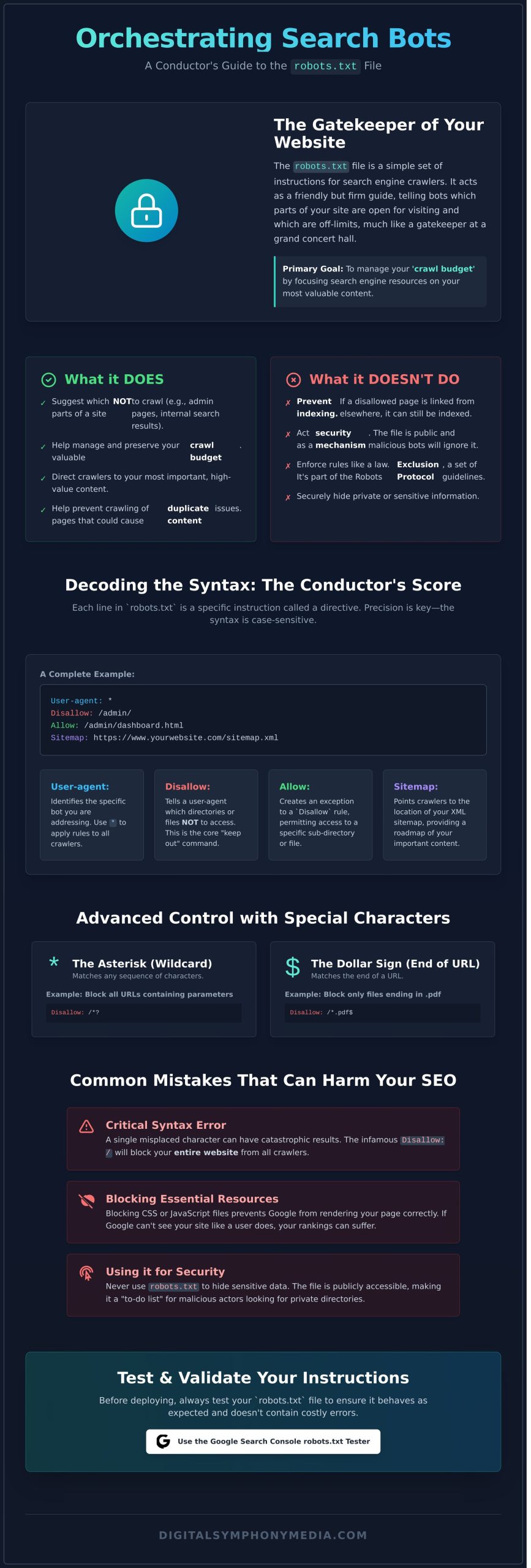
Think of your website as a grand concert hall and the robots.txt file as the friendly but firm gatekeeper at the main entrance. This simple text file contains a set of instructions for visiting web robots (also known as crawlers or spiders), telling them which doors are open and which areas are off-limits. Its primary role is to orchestrate crawler traffic, ensuring search engine bots like Googlebot don’t overwhelm your server by trying to access everything at once. It’s the first step in building a harmonious and productive relationship with search engines.
While it provides clear directions, it’s important to understand that these are guidelines, not unbreakable laws. Reputable crawlers will respect your instructions, but malicious bots will ignore them entirely. This set of guidelines, formally known as the Robots Exclusion Protocol, is a cornerstone of web etiquette, not a security feature.
What Robots.txt Does vs. What It Doesn’t Do
To drive measurable success with your SEO, you must understand this file’s capabilities and its limitations. It is a powerful tool, but it has a very specific job.
- What it does do: It suggests which parts of a site not to crawl, like admin login pages or internal search results. This helps manage your ‘crawl budget’ by focusing search engine resources on your most valuable content.
- What it doesn’t do: It does not prevent pages from being indexed. If another website links to one of your “disallowed” pages, Google may still index it without crawling the content. Critically, it does not hide private information securely, as the file itself is publicly accessible.
Why Robots.txt is a Key Part of Technical SEO
In the grand symphony of technical SEO, the robots.txt file plays a crucial opening note. It is one of the very first things a search engine crawler looks for when visiting your site. A well-configured file is a foundational element of a strategic SEO roadmap. It prevents wasting your valuable crawl budget on unimportant pages (like print-friendly versions or filtered category views), helps avoid potential duplicate content issues from being crawled, and ultimately directs search engines to the content you want them to amplify.
The Core Components: Understanding Robots.txt Syntax
Think of your robots.txt file as the conductor’s score for search engine crawlers. It’s a simple, plain text file, but its power lies in its precision. Each line contains a directive-a specific instruction-followed by a value that defines its scope. The syntax is case-sensitive, meaning Disallow is not the same as disallow. This precision is paramount; one small typo can inadvertently block your entire site from being crawled or open up private areas you meant to hide.
To demystify the structure, here is a simple yet complete example:
User-agent: *
Disallow: /admin/
Allow: /
Sitemap: https://www.yourwebsite.co.uk/sitemap.xml
User-Agent: Speaking to Specific Bots
The User-agent directive identifies the specific web crawler, or “bot,” you are addressing. While you can orchestrate unique rules for individual bots like Googlebot or Bingbot, the most common approach is to use a universal wildcard (*) to apply rules to all crawlers in harmony. This ensures a consistent baseline for every bot that visits your site.
Disallow & Allow: The Core Crawling Directives
These two directives form the heart of your instructions, defining the boundaries of the crawl. The Disallow command tells a user-agent which parts of your site not to access. You can block an entire directory (e.g., /images/) or a single file (e.g., /private-page.html). Conversely, the Allow directive-a valuable tool primarily recognised by Google-creates a specific exception to a broader Disallow rule. To master these nuances, consulting Google’s official robots.txt guide is a strategic move for any site owner.
Using Wildcards and Special Characters for Advanced Control
For more granular control, you can use special characters to create more flexible and powerful rules. These symbols allow you to craft instructions with surgical precision, guiding crawlers exactly where you want them to go.
- The asterisk (
*) acts as a wildcard, matching any sequence of characters. - The dollar sign (
$) marks the end of a URL, ensuring a rule only applies to URLs ending with that exact string.
This combination is particularly effective for blocking all URLs that contain parameters, which can often lead to duplicate content issues. For example, the following directive prevents crawlers from accessing filtered product pages or internal search results:
User-agent: *
Disallow: /*?*
How to Create and Implement Your Robots.txt File (Step-by-Step)
Creating and implementing a robots.txt file is a foundational step in orchestrating your website’s relationship with search engines. While it sounds technical, the process is straightforward with the right guidance. This step-by-step roadmap will help you craft and deploy a file that provides clear instructions to search engine crawlers, ensuring they index your site in perfect harmony with your SEO strategy.
Precision is paramount here. Even a small typo can cause the file to be ignored or misinterpreted, so follow these steps carefully.
Step 1: Creating the File
Your robots.txt file must be a plain text document. Use a simple editor like Notepad (Windows), TextEdit (Mac), or a code editor like VS Code. Critically, avoid word processors like Microsoft Word or Google Docs, as they inject formatting code that will render the file unreadable to search engine bots. The file must adhere to a simple format, first laid out in the original robots.txt specification, which requires unformatted text. Save the file with the exact name, in all lowercase: robots.txt.
For most UK businesses using WordPress, this starter template is a robust starting point:
Disallow: /wp-admin/
Allow: /wp-admin/admin-ajax.php
Sitemap: https://yourdomain.co.uk/sitemap.xml
This template tells all search engines (User-agent: *) not to crawl the WordPress admin area, but allows access to a necessary file within it, and points them to your sitemap.
Step 2: Uploading to Your Website
Once created, your file needs to be placed in the correct location: the root directory of your website. This is the top-level folder of your domain. You can typically upload it using:
- An FTP Client: Tools like FileZilla allow you to connect to your server and drag the file into the main folder (often named
public_htmlorwww). - cPanel File Manager: Most web hosts provide a File Manager in their cPanel dashboard, offering a simple interface to upload the file to the root directory.
Note: Some platforms, like Shopify, manage the robots.txt file for you, offering a simplified editor within their system instead of direct file access.
Step 3: Verifying the File is Live
The final step is to ensure your instructions are publicly accessible. You can verify this instantly by opening a web browser and navigating to yourdomain.co.uk/robots.txt (replacing yourdomain.co.uk with your actual domain). If successful, you will see the plain text content of the file you just created. This confirms that search engines can now find and follow your directives.
Feeling unsure about orchestrating these technical details? Our technical SEO experts can handle this for you.
Strategic Use Cases: When and What to Block
Moving beyond simple directives, the true power of a robots.txt file lies in its strategic application. Think of it less as a gatekeeper and more as a conductor’s baton, allowing you to orchestrate crawler behaviour for maximum SEO impact. The goal is to preserve your valuable ‘crawl budget’-the finite number of pages search engines will crawl on your site. By guiding bots away from low-value pages, you ensure they focus their attention on the content that truly drives sustainable growth.
It’s crucial to remember a key distinction: blocking a page from being crawled does not guarantee it won’t be indexed. If a blocked page is linked to from elsewhere, Google may still index it without visiting the content. True indexing control requires a ‘noindex’ meta tag on the page itself.
Blocking Low-Value and Admin Pages
Every website has pages that offer no SEO value. Directing crawlers away from these areas is a fundamental step in optimising your crawl budget. This ensures search engines spend their time on your most important content. Common examples include:
- Admin areas: Login portals like
/wp-admin/that are for internal use only. - Internal search results: Pages generated by your site’s search function, which create endless, thin-content URLs.
- ‘Thank you’ pages: Confirmation pages after a form submission that don’t need to rank.
- Development environments: Staging or test subdomains that should never appear in public search results.
Managing Duplicate Content from URLs
URL parameters used for tracking (like UTMs) or filtering (e.g., ?colour=blue) can create multiple versions of the same page, diluting your SEO authority. By using a broad directive like Disallow: /*? in your robots.txt file, you instruct bots to ignore any URL containing a question mark. This strategic move helps consolidate link equity and ranking signals to a single, canonical URL, creating a more harmonious and powerful SEO profile. It’s a precise tactic to ensure your authority isn’t fragmented across dozens of near-identical pages.
Controlling Crawling of Media and Resource Files
You may choose to block crawlers from accessing certain files like PDFs, spreadsheets, or specific image directories. The primary benefit is conserving crawl budget, especially if you host thousands of large files. However, the downside is missing potential traffic from Google Images or users searching for specific documents. Importantly, disallowing an image file here won’t stop it from being indexed in Google Images if it’s embedded on a page that is crawled and indexed.
Common Robots.txt Mistakes That Can Harm Your SEO
Your robots.txt file is a powerful tool in your SEO orchestra, but a single wrong note can bring the entire performance to a halt. In our SEO audits, we frequently uncover simple mistakes that render websites partially or completely invisible to search engines. To ensure your digital presence achieves perfect harmony, here is a checklist of the most damaging errors to avoid.
The Catastrophic ‘Disallow: /’ Error
This is the most devastating mistake you can make. This single line of code tells every search engine bot to ignore your entire website. It is the digital equivalent of locking the doors to your venue and turning off the lights before a performance. Always double-check that this directive is not present unless you intend to block your entire domain.
- Incorrect Code (Blocks Entire Site):
User-agent: *
Disallow: / - Correct Fix (Allows Full Access):
User-agent: *
Disallow:
Blocking Critical CSS and JavaScript Files
Google no longer just reads your HTML; it renders your pages to understand context and user experience, just like a human visitor would. Blocking CSS and JavaScript files prevents this, leaving Google with a broken, unstyled version of your site. This incomplete picture can lead to significant misunderstandings of your content and harm your rankings.
- Incorrect Code (Blocks Resources):
User-agent: Googlebot
Disallow: /wp-content/themes/
Disallow: /assets/js/ - Correct Fix (Allows Resources):
User-agent: Googlebot
Allow: /wp-content/themes/*.css
Allow: /wp-content/themes/*.js
Confusing Robots.txt with Noindex Directives
A common misconception is that a `Disallow` directive will remove a page from Google’s search results. It will not. It only stops Google from crawling it. If the page is already indexed or linked to from another site, it can still appear in search results. The rule is simple: use your robots.txt file to manage crawl budget, and use a `noindex` tag to manage indexing.
- To Block Crawling (Use robots.txt):
User-agent: *
Disallow: /private-page/ - To Prevent Indexing (Use a Meta Tag):
Add this to your page’s HTML<head>section:<meta name="robots" content="noindex">
Orchestrating these technical elements correctly is vital for SEO success. If you are unsure if your website is configured for peak performance, contact us for a strategic technical audit.
How to Test and Validate Your Robots.txt File
Crafting your directives is like composing a crucial part of your digital symphony; one wrong note can disrupt the entire performance. Before you deploy any changes, it is essential to test and validate your work. This final, critical step ensures search engines interpret your instructions precisely as intended, forming a cornerstone of a technically sound and healthy website. It empowers you to move forward with confidence, knowing your site’s accessibility is perfectly orchestrated.
Using Google’s Robots.txt Tester
Google provides the definitive tool for this task: the robots.txt Tester, available within Google Search Console. To use it, simply navigate to the tool and paste the entire contents of your file into the editor. The tester will immediately analyse your code, highlighting any syntax errors or logical warnings in real-time. This gives you direct insight into how Googlebot will interpret your rules, removing guesswork and ensuring perfect harmony between your intentions and the crawler’s actions.
Testing Specific URLs Against Your Rules
Beyond checking syntax, the tool’s real power lies in testing specific URLs. You can enter any URL from your website to see if it is Allowed or Blocked by your current directives. Furthermore, you can select different Google user-agents (like Googlebot for web search or Googlebot-Image for images) to confirm your rules are working as expected for each crawler type. This proactive testing ensures every part of your site is accessible-or restricted-according to your strategic roadmap.
Submitting Your Updated File to Google
Once you have validated your code and confirmed your rules work correctly, upload the updated file to the root directory of your domain. To accelerate the discovery process, you can return to the robots.txt Tester and submit your live file. This signals to Google that your instructions have changed. While Google will eventually recrawl the file on its own, this action encourages a faster update, though be aware that changes may not be reflected instantly.
Ensuring your robots.txt file is flawless is a foundational element of technical SEO, but it’s often just one piece of a much larger puzzle. A misconfigured directive can hide deeper site architecture issues or indexing problems. A technical SEO audit can uncover these issues and more, providing the clarity needed to drive sustainable growth. Get your free audit today.
Orchestrating Your Crawlers for SEO Success
Mastering your robots.txt file is a fundamental step in conducting a successful SEO strategy. As we’ve explored, this simple text file gives you powerful control over how search engines interact with your site, allowing you to guide crawlers efficiently and protect your crawl budget. Remember, the key is strategic implementation: using directives to create harmony between your content and the crawlers that index it, because a single misplaced character can create dissonance and harm your visibility.
Ensuring every note of your technical SEO is flawless is where a true partner makes the difference. With over 75 years of combined online marketing experience and a proven track record of orchestrating page 1 rankings, we are strategic partners focused on your measurable growth. Ready to ensure your technical SEO is in perfect harmony? Request a complimentary SEO audit from our experts.
Frequently Asked Questions About Robots.txt
What is the difference between robots.txt and a noindex tag?
Think of robots.txt as a polite suggestion and a noindex tag as a direct command. The robots.txt file asks search engine crawlers not to crawl specific pages or sections. However, a disallowed page can still be indexed if linked to from elsewhere. In contrast, a noindex tag is a firm directive placed on a page’s HTML that tells search engines not to include that page in search results, offering more definitive control.
Does every website need a robots.txt file?
While not strictly mandatory, having a robots.txt file is a strategic best practice. Without one, search engines assume they have permission to crawl your entire site. Creating a file gives you control, allowing you to prevent crawlers from accessing non-public areas like admin pages or test environments. This helps you orchestrate an efficient crawl budget, focusing search engine attention on the content that truly matters for your business growth.
How do I block a single page but allow everything else in that folder?
You can achieve this with precise directives. You must specifically disallow the single page while ensuring the parent folder is allowed. For example, to block `example.co.uk/services/private-page` but allow everything else in the `/services/` folder, you would use these rules:
User-agent: *Allow: /services/Disallow: /services/private-page
This approach provides granular control over your site’s crawlability.
Can I use robots.txt to block malicious bots and scrapers?
While you can disallow specific user-agents in your robots.txt file, it’s not a reliable security measure. The file operates on an honor system, which reputable crawlers like Googlebot respect. However, malicious bots and aggressive content scrapers are programmed to ignore these rules entirely. For robust protection, you need to implement server-side security solutions like firewalls or IP blocking, as robots.txt offers no real defence against bad actors.
Where is the robots.txt file located on a WordPress site?
Your robots.txt file resides in the root directory of your website. You can typically view it by navigating to `yourdomain.co.uk/robots.txt`. By default, WordPress generates a virtual file. To customise it, you can use a dedicated SEO plugin like Yoast or Rank Math, which provides a user-friendly interface. Alternatively, you can create a physical file and upload it to your root folder via FTP, which will override the default WordPress settings.
What does ‘User-agent: *’ mean in a robots.txt file?
The `User-agent:` directive specifies which web crawler the rules apply to. The asterisk `*` acts as a wildcard, meaning the instructions that follow apply to all crawlers. It’s a universal command that ensures every search engine bot, from Googlebot to Bingbot, adheres to the same set of rules. This is the standard way to set global crawling policies for your website, establishing a baseline for how your digital presence is accessed.
Should I include my sitemap URL in the robots.txt file?
Yes, absolutely. Including your sitemap URL in your robots.txt file is a critical best practice for SEO. It acts as a clear roadmap, directly pointing search engine crawlers to a comprehensive list of all the important pages you want them to discover and index. This helps ensure your content is found efficiently, allowing you to orchestrate a more effective and harmonious indexing strategy for your entire website.